


I look at a video player differently from a streaming service. The important question is not how many shows it carries, but whether it handles my own files without getting in the way. That is where NOVA Video Player makes its case: it is a free Android app for playing local and network video, with tools for downloading subtitles and metadata. After using it as a practical library player rather than a content platform, I found it most appealing for people who keep films, series, recordings, or other media outside the usual streaming apps.
My decision came down to four things: how easily I could reach files, how much work was needed to make a library look organized, whether subtitles behaved properly, and how much control I had over playback. NOVA is not trying to replace a streaming subscription. It sits between a basic file opener and a full media-library interface, and that middle position is both its strength and its limitation.
What matters before choosing a player
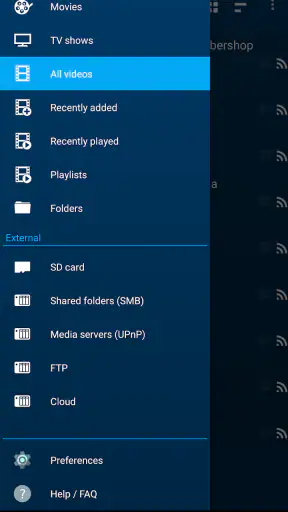
The first question is where your videos live. If everything is watched through one streaming service, installing a separate player may add little. NOVA becomes more useful when your collection is spread across phone storage, removable storage, or a compatible network location. Being able to treat those sources as one viewing experience is more convenient than opening a file manager every time I want to continue a video.
The second question is how much organization you want. A simple player can start a file quickly, but it usually leaves filenames, folders, and subtitle hunting entirely to you. NOVA is designed for a more library-like experience. Metadata and subtitle downloading can reduce the manual work involved in turning a folder of files into something easier to browse. That convenience is valuable, although it also means the initial setup and matching process deserve attention.
I also consider the device itself. The app requires Android 6.0 or later, so it suits a wide range of Android phones and media devices, but an older device may still feel less comfortable with large libraries or demanding video files. The current version is 6.4.51-20260820.1839, which is useful context when checking compatibility before moving an established collection into it.
Finally, I ask whether the player should be simple or flexible. A minimalist player is often better for someone who opens one downloaded clip, watches it, and deletes it. NOVA makes more sense when you want browsing, network access, subtitles, and information around your videos. In my experience, the extra structure pays off only if I actually use those features.
My first impression of the library approach
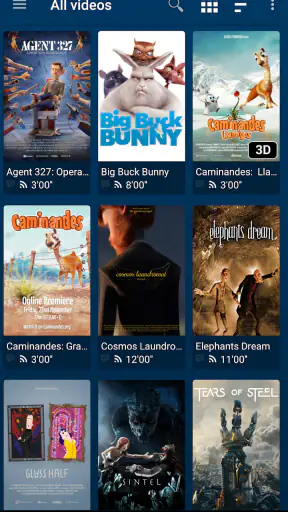
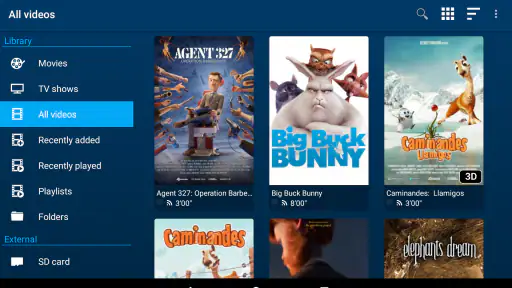
What I noticed immediately was the difference between selecting a single video and managing a collection. A basic Android video tool tends to think in terms of files. NOVA encourages me to think in terms of a personal catalog. That change is subtle, but it affects how I store media: consistent filenames and sensible folders become more worthwhile because the app has more to work with.
For a mixed collection, I would begin with a small, clearly named folder instead of scanning every location at once. This is one of the most useful practical habits I found. It makes it easier to see whether the app identifies titles correctly and prevents a cluttered library from becoming the first impression. Once that smaller group behaves as expected, adding other folders is less frustrating.
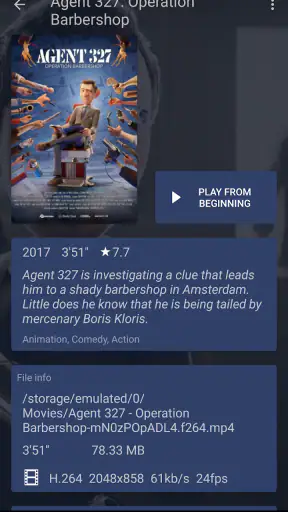
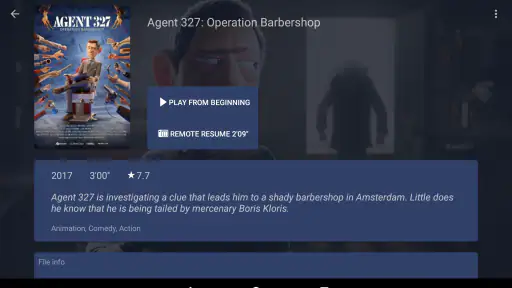
The metadata feature is especially helpful for episodic content, where a bare filename can be difficult to recognize from a distance. It can also make a personal film collection feel less like an archive of downloads. Still, I would not treat automatic matching as something to trust blindly. Unusual filenames, alternate cuts, home recordings, and files with similar titles can lead to the wrong description. I prefer checking the result before relying on the library as my main source of information.
Subtitle handling is more important than it sounds
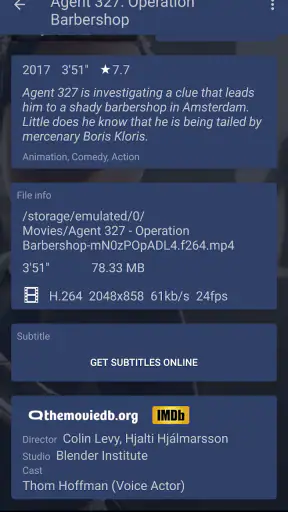
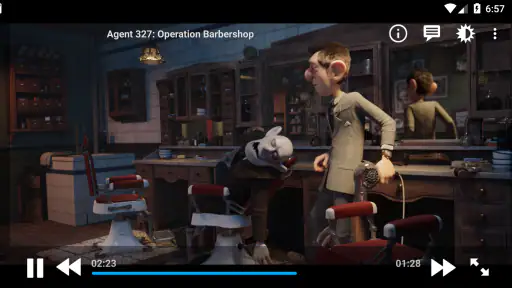
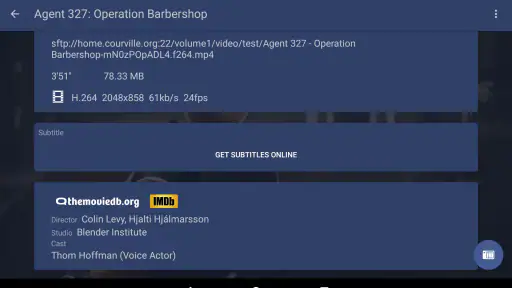
Subtitle support is one of the reasons I would choose NOVA over a very basic player. When I watch foreign-language material or videos with unclear dialogue, having subtitle downloading connected to the playback workflow saves time. I do not have to stop, switch to a browser, search separately, rename a file, and return to the player for every episode.
My practical tip is to check the subtitle language and timing as soon as playback begins. A subtitle file can be correct for the title but still be out of sync with a different edit or release. If the first few lines appear early or late, I would rather adjust or replace them immediately than continue watching and hope the problem disappears. This is also why I would keep original video filenames reasonably descriptive; better identification generally means less searching.
There is a trade-off here. Automatic assistance is convenient, but it is not the same as a carefully curated subtitle library. People who need precise captions for accessibility, classroom use, or professional review should still verify accuracy and timing. NOVA helps with the workflow; it does not remove the responsibility to check whether the result is suitable.
Where NOVA Video Player wins in everyday use
The clearest advantage is the combination of local and network playback in one app. I can imagine using it at home with videos stored on a phone for travel, then returning to a larger collection on a network location without changing to an entirely different player. That is more natural than maintaining separate apps for files in different places.
A realistic example is a weekend trip. Before leaving, I place a few episodes and a film on my Android device, check that subtitles are available, and open them through the same library I use for other videos. On the return journey, I can watch without depending on a streaming connection. At home, the network side becomes more useful because I do not need to copy every large file onto the phone first.
This is also a good fit for family recordings and personal projects. A folder of clips can be easier to browse when the player presents more context than a list of filenames. I would not expect professional cataloging, but for ordinary household media, the presentation can make the collection feel more approachable.
Another strength is that the app is free. That matters when I am testing a player against an existing setup or need a second tool for a particular Android device. The Everyone content rating also makes it straightforward to consider for a general household environment, although the suitability of the videos themselves still depends on what the owner stores and plays.
The app has also attracted a substantial Android audience, with over a million installs and an average rating of 4.0 from around thirteen thousand ratings. I do not treat popularity as proof that every device will behave identically, but it does make NOVA feel like an established option rather than an obscure experiment. Courville Software is the developer behind it, and the app has been available since August 19, 2018.
Small workflow choices that improve the experience
I would keep one folder for finished videos and another for items still being checked. That simple separation helps when metadata or subtitles are not yet correct. It also prevents an unfinished download from appearing beside a ready-to-watch film and makes it easier to identify which files need attention.
For network content, I would start with a short test rather than opening a very large collection immediately. Play one file from the intended location, check seeking and subtitle behavior, and only then build the broader library. This approach separates a player issue from a storage or network issue. It is a small diagnostic habit, but it saves time when something does not appear or playback is inconsistent.
I also prefer testing the exact files I watch most often. A player can feel excellent with standard video and less comfortable with a collection containing unusual formats, very large files, or inconsistent subtitle naming. NOVA should be judged against your own library, not only against a short sample clip. That is the most important non-obvious trade-off for anyone deciding whether to switch.
For travel, I would test offline access before leaving home. Opening a local file while still connected does not prove that every part of the workflow will be convenient without a connection. Downloading the video and subtitle first, then starting playback in a disconnected situation, gives a much more honest result. It also exposes missing subtitles before they become a problem on a plane or in a place with unreliable service.
Where another type of app may fit better
NOVA is not automatically the best choice for everyone. If I only watch videos from major streaming platforms, the official streaming apps are usually more direct. They already handle accounts, catalogs, recommendations, and offline downloads within their own services. A local-library player cannot replace that convenience because it solves a different problem.
A very simple file player may also be preferable for someone who values speed over organization. If the routine is “tap a video and watch,” metadata and subtitle tools can feel like unnecessary layers. In that situation, the best alternative is not necessarily another feature-rich library app; it may be the player already built into the device, provided it handles the files and subtitles you need.
People with a carefully managed media server may prefer a dedicated client designed around that server’s catalog and account system. Such a client can offer a more consistent remote-library experience, while NOVA is more appealing when the collection is mixed between local storage and network content. I would choose based on where the library is managed: on the Android device and its accessible folders, or inside a separate server ecosystem.
There is also a difference between a personal media player and an editing tool. NOVA belongs to the first group. It is not the app I would choose to cut clips, add transitions, record a project, or prepare a finished export. Its category is video players and editors in the broad app-store sense, but my experience with it is firmly about watching and organizing video, not producing it.
Users who need a highly polished interface above all else should spend time testing navigation with their own collection. A library-focused player can be more capable than a basic one while also requiring more decisions. If you dislike correcting metadata, checking subtitle matches, or thinking about folder structure, the flexibility may feel like work instead of freedom.
The real cost of switching
Because NOVA is free, the main cost is not money. It is the time spent pointing the app toward folders, checking how titles are identified, confirming network access, and deciding whether the new library should replace an existing routine. That cost is modest for a small collection, but it grows with a large or untidy one.
I would not uninstall the old player immediately. For the first few days, I would keep both available and compare the same handful of files. Test a local video, a network video, a subtitle-heavy title, and a file with an unusual name. This gives a clearer answer than judging the app from one successful playback.
Switching can also expose habits that were previously hidden. If your old method depends on carefully arranged folders, NOVA may make that structure more visible. If your collection is chaotic, the app may encourage you to clean it up. That is a benefit for some people and a burden for others. I see it as a useful trade: better browsing in exchange for a little preparation.
Before committing, I would make sure important files remain in their original locations and treat the app as a viewing layer rather than the sole copy of the library. This is sensible with any media player, especially when network folders and downloaded files are involved. A player should make access easier, not become the only place where your organization exists.
My recommendation after using it
I recommend NOVA Video Player to Android users who regularly watch their own media and want more than a bare file opener. Its strongest case is the combination of local playback, network content, subtitle downloading, and metadata support. Those features work together best for a personal collection that is large enough to need browsing but not so specialized that it requires a dedicated server client.
I would particularly suggest it to someone who travels with downloaded videos, watches material in several languages, or keeps a mixture of phone and network files. The everyday benefit is not one dramatic feature; it is the reduced friction between finding a title, identifying it, locating subtitles, and starting playback.
I would skip it if your viewing happens almost entirely inside streaming services, if you want an editing workstation, or if you strongly prefer the simplest possible tap-and-play experience. I would also test a representative sample of your own files before moving a large collection, because compatibility and organization matter more than the store summary can show.
For me, the final decision is straightforward: NOVA is a sensible free choice when the video files belong to me or are available through my network, and when I am willing to spend a little time setting up the library properly. It does not replace every kind of video app, but within its lane it offers a practical balance of convenience and control. If that describes the way you watch, it is worth trying; if it does not, a streaming client or simpler player will probably be the better fit.


